Best overall: restaurant ordering from Zapiet. Best for basic delivery eligibility: Shopify’s native local delivery. Best for marketplace discovery: Uber Eats. This 2026 guide compares Shopify local delivery apps for restaurants with the alternatives, so you can choose the right ordering model before configuring delivery.
- Zapiet Eats is the restaurant-ordering choice among Shopify local delivery apps for restaurants, covering menus, pickup and delivery.
- Shopify’s native local delivery suits straightforward delivery eligibility, but it is not a dedicated restaurant-ordering app.
- Uber Eats suits marketplace discovery, not merchants seeking a Shopify-native ordering workflow.
- Choose around kitchen preparation, delivery boundaries and order ownership—not the longest feature list.
Why this matters
A restaurant delivery order creates obligations beyond checkout. Your kitchen needs to prepare it, someone needs to dispatch it, and the customer needs a clear delivery promise. An accepted address is only the beginning.
The first decision for your 2026 setup is therefore not which app has the most settings. It is whether you need a restaurant-ordering system, a basic delivery eligibility rule, or access to a marketplace audience. Those are different jobs.
Keep the ordering channel, delivery rules and physical delivery operation separate in your evaluation. Software can organise an order without supplying a driver. A marketplace can introduce a customer without making your Shopify store the centre of the transaction.
What makes the best restaurant delivery setup?
Use these criteria before reading the ranking. They apply whether you operate a restaurant, takeaway or coffee shop.
- Restaurant ordering: Customers need to understand the menu and submit an order your team can prepare. Assess the menu workflow, not just the delivery selector.
- Delivery eligibility: Your checkout must distinguish addresses you serve from addresses you do not. Decide whether distance or postcodes match your actual delivery area.
- Preparation and handoff: Check how ordering fits kitchen preparation, collection and dispatch. Do not assume a delivery option also manages kitchen workload.
- Pickup alongside delivery: Customers choosing collection need instructions that differ from delivery instructions. Assess both journeys when you offer both services.
- Order ownership: Establish where staff receive orders, who handles changes and which channel owns customer communication.
- Operational limits: Identify the rules you cannot compromise on, then confirm them before committing. A broad category description is not proof of a specific configuration.
For a 2026 shortlist, these criteria matter more than a generic app-store comparison. Start with your fulfilment promise and work backwards to the software required to support it.
Restaurant delivery options at a glance
The comparison includes a restaurant app, a native Shopify feature and a marketplace. They are alternatives for different needs—not interchangeable Shopify apps.
| Option | Best for | Standout distinction | Key limitation |
|---|---|---|---|
| Zapiet Eats | Restaurant ordering through Shopify | Restaurant-focused ordering covering menus, pickup and delivery | Software does not replace kitchen preparation or physical delivery |
| Shopify native local delivery | Basic address eligibility | Shopify documents delivery areas based on radius or postal codes | Delivery eligibility is not a complete restaurant-ordering workflow |
| Uber Eats | Marketplace discovery | Customers order through a restaurant marketplace | Marketplace ordering is distinct from your Shopify checkout |
Choose the row that matches the problem you need to solve. If customers cannot place a suitable restaurant order, address menu and ordering first. If the ordering journey works but delivery boundaries are unclear, focus on eligibility. If your priority is discovery, evaluate a marketplace separately.
1. Zapiet Eats: best for restaurant ordering through Shopify
Zapiet Eats is the restaurant-ordering choice for Shopify merchants offering menus, pickup and local delivery. The restaurant-focused positioning makes it the relevant starting point when ordering food—not simply validating an address—is the task.
Begin your evaluation with a real menu journey. Ask a staff member to follow an order from customer selection through preparation and handoff. Assess the practical requirements of your restaurant rather than treating the app category as a promise that every workflow is covered.
Zapiet Eats pros
- Restaurant and coffee-shop ordering is part of the stated product scope.
- Menus, pickup and delivery belong in the same restaurant-ordering evaluation.
- The Shopify focus matches merchants who want their own store to support direct ordering.
Zapiet Eats cons
- An ordering app does not prepare meals, organise your staff or physically deliver orders.
- Restaurant-specific positioning does not establish support for every kitchen rule or existing integration; confirm your requirements individually.
Best for: Restaurants using Shopify that need to evaluate the food-ordering journey alongside pickup and local delivery.
Your decision should turn on the handoff between customer choice and staff action. Can the team understand what the customer ordered? Are collection and delivery instructions clear? Does your configuration express a promise the kitchen can meet?
Do not approve a setup just because the customer-facing journey looks tidy. Follow the same order through the staff workflow, including what happens when a customer calls to change it. That exercise exposes operational gaps a feature checklist misses.
Verdict: Buy only after the restaurant-ordering workflow passes your operational checks. This is the first option to evaluate when Shopify is your direct-ordering channel.
2. Shopify native local delivery: best for basic address eligibility
Shopify’s native local delivery is a platform feature, not a separate restaurant app. Shopify’s local-delivery documentation describes delivery areas configured by radius or postal codes, making it a relevant starting point for straightforward address eligibility.
Use it when your menu and ordering process already meet your needs and the remaining question is whether an address qualifies for delivery. Do not treat an eligible address as evidence that preparation, scheduling or dispatch is also covered.
Shopify native local delivery pros
- Local delivery is part of the Shopify platform rather than a separate restaurant marketplace.
- Radius and postal-code approaches provide distinct ways to define your service area.
- The feature lets you assess basic delivery eligibility separately from restaurant-ordering requirements.
Shopify native local delivery cons
- A delivery-area rule is not a dedicated menu or restaurant-ordering system.
- Address eligibility does not establish whether your kitchen or delivery team can fulfil an order at the requested time.
Best for: Restaurants whose Shopify ordering workflow already works and whose immediate requirement is a clear delivery boundary.
Choose your boundary method deliberately. A radius describes proximity to a location. A postcode list describes selected address areas. Neither should be selected merely because it is easier to enter; use the method that matches the addresses your team intends to serve.
Shopify native local delivery also needs an operational owner. Someone must keep the service-area settings aligned with the restaurant’s delivery policy. Otherwise, the checkout rule and staff instructions become separate versions of the same promise.
Verdict: Hold on adding another app until you have checked whether native delivery eligibility solves the specific problem. Add specialist ordering functionality when the restaurant workflow—not just the boundary—requires it.
3. Uber Eats: best for marketplace discovery
Uber Eats is a restaurant marketplace, not a Shopify local delivery app. It belongs in this comparison because restaurants also choose between accepting orders through their own store and participating in a separate ordering channel.
Use that distinction to frame the decision. Marketplace participation addresses discovery and marketplace ordering; a Shopify restaurant app addresses ordering through your store. Comparing them as if they were equivalent checkout extensions leads to the wrong shortlist.
Uber Eats pros
- Restaurant discovery and ordering take place within a marketplace context.
- It provides a channel separate from customers visiting your Shopify store directly.
- Its restaurant focus makes it relevant when marketplace participation is the objective.
Uber Eats cons
- Marketplace orders do not turn your Shopify checkout into a restaurant-ordering workflow.
- A separate ordering channel requires its own staff responsibilities, menu maintenance and customer-service process.
Best for: Restaurants evaluating a marketplace channel rather than looking solely for a Shopify-native ordering setup.
Before adding the channel, decide who maintains the menu and who monitors incoming orders. Then define how staff handle an unavailable item or a customer question. These responsibilities remain important even when the customer-facing ordering experience sits outside your store.
Running direct ordering and marketplace ordering together is a channel-management decision. Treat each accepted order as a commitment against the same kitchen workload. Do not evaluate each channel in isolation from the people preparing the food.
Verdict: Skip Uber Eats as a substitute for a Shopify app; evaluate it separately when marketplace discovery is your goal.
Check the workflow before you choose
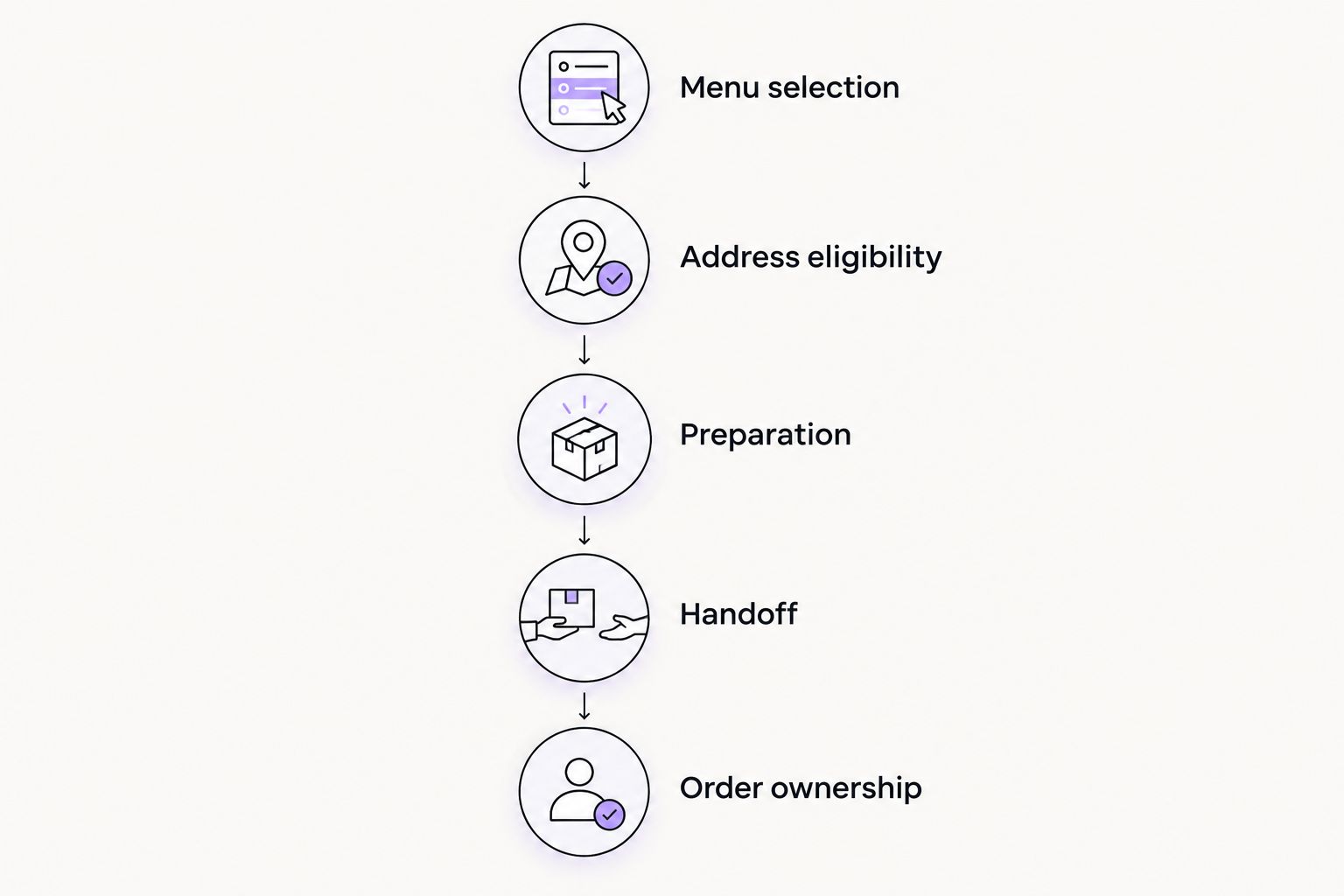
For your 2026 setup, write down the customer promise before configuring software. A short workflow document gives staff and developers something concrete to validate.
Menu selection
Start with a representative order from your actual menu. Include the information the kitchen needs to prepare it correctly. Check whether that information survives the journey from customer selection to the staff-facing order.
Address eligibility
Use addresses that challenge your boundary rather than only checking one obviously eligible customer. Test 2 boundary addresses: one you intend to serve and one you intend to reject. This is a recommended test, not a performance benchmark.
Preparation
Explain when staff begin preparing an accepted order and how they identify its fulfilment method. Confirm any scheduling or workload requirements directly with the option you are evaluating; do not infer them from the word delivery.
Handoff
Write separate instructions for collection and delivery. A customer arriving at the restaurant needs a different handoff from a driver taking food away. Specify who checks that the correct order leaves the kitchen.
Order ownership
Assign 1 fulfilment owner per shift. That person should know where incoming orders appear, who handles exceptions and how the customer receives an update. Ownership is a restaurant operating rule, not an app feature.
Run a restaurant-specific acceptance test
Before your 2026 launch, use 3 test orders: an eligible delivery order, a rejected delivery address and a pickup order. Run these as controlled checks so staff understand that they are tests.
For the eligible delivery order, follow the information through every handoff. Check what the customer sees, what the kitchen receives and what the person dispatching the order needs. Record unclear instructions rather than relying on staff to remember exceptions.
For the rejected address, inspect the customer’s next step. The important question is whether the journey clearly communicates that delivery is unavailable for that address. Confirm that the result matches your written service-area policy.
For pickup, check the collection instructions independently. A successful delivery test does not validate pickup. Staff should recognise the fulfilment method without needing to reconstruct it from a customer’s message.
Finally, rehearse a change request. Decide who can respond and how the kitchen learns about the change. Do not assume every option supports the same editing process; verify the actual workflow before accepting live orders.
How we ranked these options
This 2026 ranking uses restaurant-ordering fit, delivery eligibility, preparation handoff, pickup requirements and order ownership. It ranks options by their stated purpose rather than claiming measured differences in speed, reliability or sales.
The restaurant-focused Shopify option comes first for merchants seeking direct food ordering. Shopify native local delivery occupies the basic-eligibility slot. Uber Eats occupies the marketplace-discovery slot because it solves a different channel problem.
The ranking is a decision tree. Your best option changes with the job you need done—not with the position of a name in a list.
Which restaurant delivery option should you choose?
Start with Zapiet Eats when you need restaurant ordering through Shopify. Validate the menu, pickup and delivery journeys against your kitchen’s requirements before making the purchase decision.
Choose Shopify native local delivery when ordering already works and your immediate need is address eligibility. Evaluate Uber Eats when marketplace discovery is the objective, not as a replacement for configuring your own store.
For an undecided restaurant, the next move is simple: document the order-to-handoff workflow, identify the missing step and evaluate the option built for that job. Avoid installing overlapping tools before you know which responsibility each one owns.
FAQ
What’s the best Shopify local delivery app for a restaurant?
Zapiet Eats is the restaurant-focused starting point for Shopify merchants evaluating menus, pickup and local delivery. Confirm the specific kitchen and delivery requirements before choosing it.
Do I need a separate app for Shopify local delivery?
You do not need a separate app solely to evaluate Shopify’s native local-delivery feature. Shopify documents delivery areas based on radius or postal codes; restaurant ordering requirements need a separate assessment.
Is Uber Eats a Shopify local delivery app?
No. Uber Eats is a restaurant marketplace, so evaluate it as a separate ordering channel rather than a Shopify checkout extension.
Should a restaurant use distance or postcode delivery rules?
Use the rule that matches your written delivery area. A radius describes proximity to a location, while a postcode list specifies selected address areas; test accepted and rejected boundary addresses.
Does a restaurant-ordering app provide delivery drivers?
Do not assume an ordering app provides drivers. Confirm physical delivery arrangements separately from menu, checkout and order-management functionality.
Can a restaurant offer pickup as well as delivery?
Yes, restaurant ordering can include both pickup and delivery. Test each journey independently because collection instructions and delivery handoffs are different.
What should I test before accepting restaurant delivery orders?
Test an eligible delivery order, a rejected delivery address and a pickup order. Follow the information from checkout to kitchen preparation and handoff, then rehearse a customer change request.
One last thing
A successful checkout is not a completed restaurant workflow. The decisive check is whether the person preparing and handing over the food receives the information needed to fulfil the customer’s promise.
Before accepting orders in 2026, ask that person to explain the next action without help. Fix any ambiguity before adding another setting, another app or another ordering channel.